Clinical photo management for pediatric surgery
Secure photo follow-up from clinic to home
One link. The right patient record.
How do you collect follow-up photos from parents after surgery?
A parent sends a follow-up photo. A nurse needs to locate it. The surgeon needs the earlier image for comparison. When photographs are spread across messages and staff phones, each step takes more work.
CureCast brings photo collection and review into one patient photo workflow. Parents upload through a secure link, and authorized staff review the images within the patient’s record.
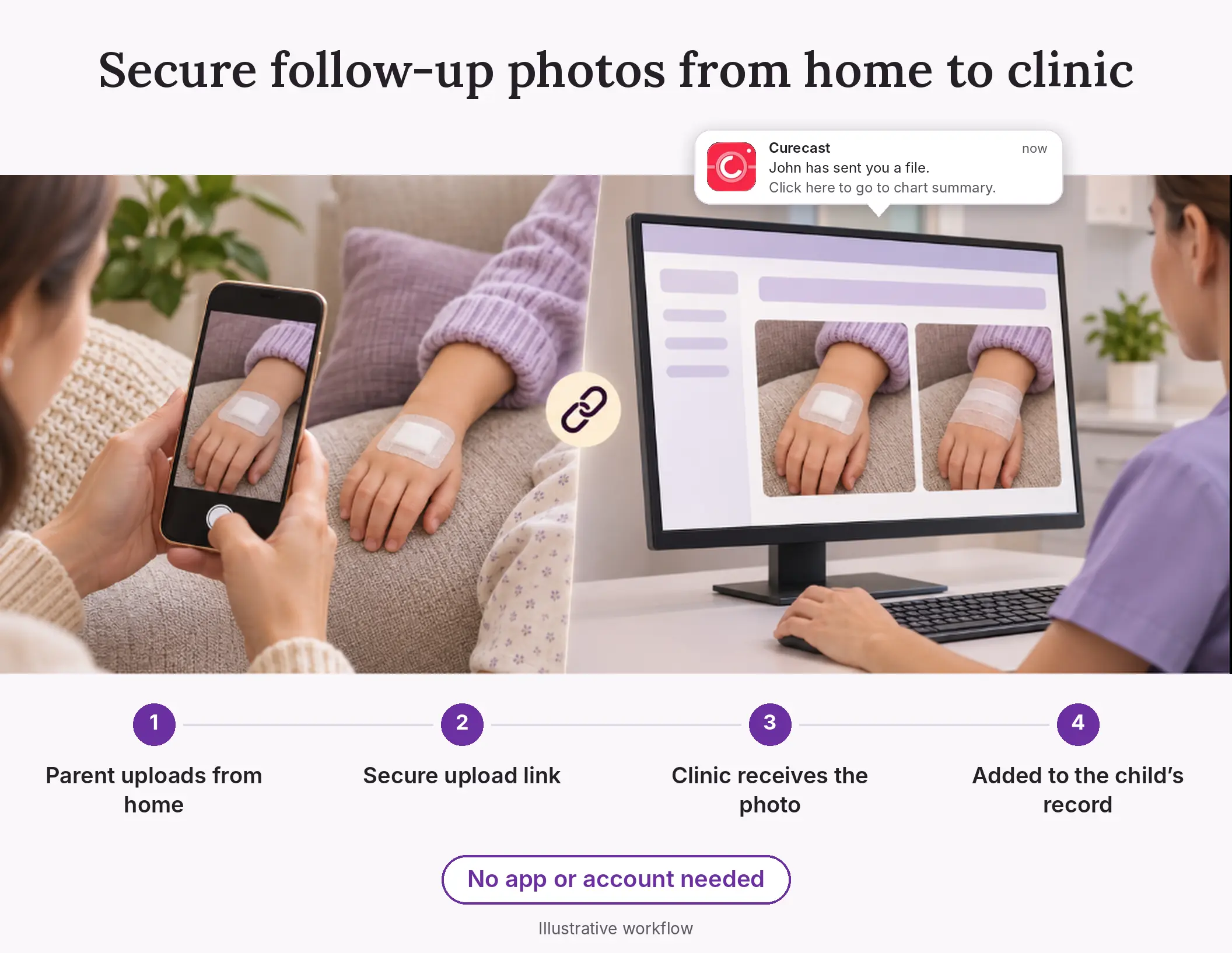
1. Send a secure upload link
Open the child’s record and create an upload link. Share it with the parent or guardian using a channel approved by your practice.
2. Parents upload from home
The parent opens the link in a browser and uploads the requested files. There is no app to install and no patient account to create.
3. Your team is notified
Uploaded files go directly into the patient’s CureCast record, alongside earlier photographs.
4. Review the photo history
Compare earlier and recent images to support postoperative review. Your team decides whether the family needs further instructions or an in-person assessment.
Day-four photo reviews at Gentle Procedures Clinic, Dubai
Dr Brian MacCormack’s team uses CureCast to collect day-four postoperative photographs from parents. Families receive a secure upload link, submit photographs from home and the clinician receives a notification when the files arrive.
The clinic’s own follow-up information for families describes a day-four photograph submitted through a secure link and reviewed personally by Dr Brian. Day four is this clinic’s schedule; each surgical team sets its own follow-up process.
UAE data storage describes this clinic’s CureCast deployment. Explore CureCast for UAE clinics →
Trusted by the best in the business
We use CureCast at Gentle Procedures Clinic in Dubai for our day 4 photo reviews after surgery. Parents receive a secure, encrypted link on WhatsApp and send photos from home, so new families don’t have to travel back to the clinic. It’s very easy for parents to use, I get a notification on my phone as soon as photos arrive, and the data is kept in the UAE. Setup was quick, and the support from Vishal and the team has been outstanding. Highly recommended.

How do you keep sensitive pediatric photographs restricted?
Pediatric surgical records can include highly sensitive photographs. Configure staff permissions and confidential-patient access to match your clinic’s responsibilities.
Hide confidential patient records
Patients marked confidential do not appear in searches, patient lists or photo collections for staff without confidential-patient access. Administrators control which staff receive this permission.
See confidential patient controls →Control photo actions
Administrators configure staff permissions, including downloading and sharing. Set permissions according to each team member’s responsibilities.
Explore security and access controls →Keep an audit history
CureCast records supported activities such as record views, photo actions, downloads and sharing, helping administrators review how patient photographs have been accessed and used.
Keep the surgical photo history together
Build a photo record that follows the patient through care:
- Baseline photographs captured in the clinic.
- Procedure-related photographs recorded by your team.
- Postoperative images uploaded by a parent or guardian.
- Later clinic photographs for follow-up comparison.
Organize photographs using relevant tags and albums so staff can retrieve images by procedure, condition or stage of follow-up. Use consistent framing and positioning when repeat photographs are needed.
See CureCast’s clinical photo management tools →Make photo instructions clear for families
Explain which area to photograph, which views your team needs and when images should be submitted. Tell families when uploads are reviewed and how to contact the clinic if they need help sooner.
Photo uploads support your clinic’s follow-up process. They are not an emergency contact channel or a substitute for an examination when one is needed.
A photo workflow for your surgical team
Explore secure parent uploads, organized follow-up photographs and confidential access in a guided demo.
Bring your clinic’s current photo process and questions. We’ll walk through how CureCast could fit.
See How CureCast Fits Your Practice
Discuss how CureCast fits into your pediatric surgical photo workflow, from capturing and organizing clinical photos to collecting follow-up images from parents.
Book your 15-minute demoPrefer email? [email protected]