Manage Every Clinic.
Control Every Patient Photo.
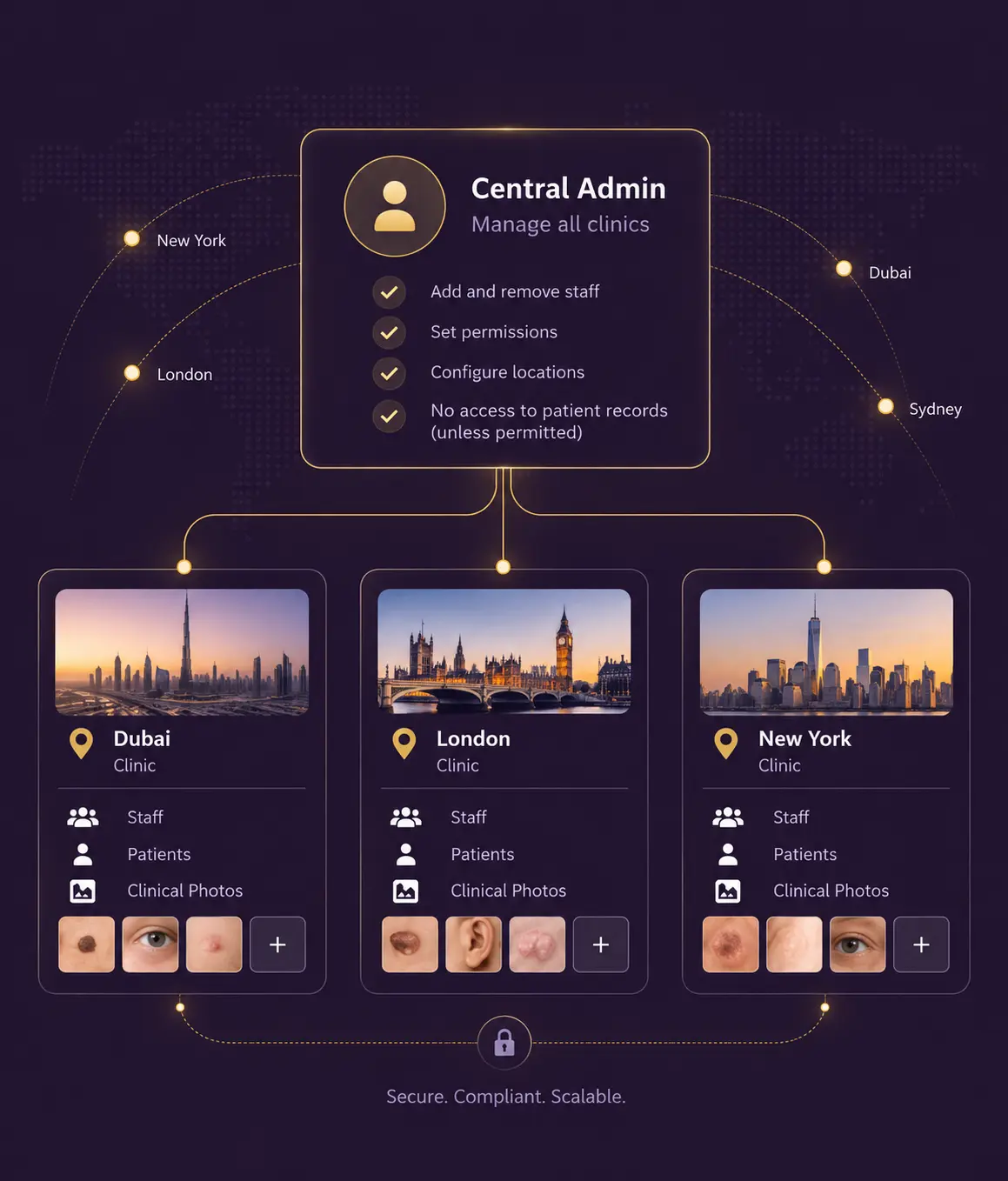
Centralized management for multi-location practices, clinic groups and franchises. Choose separate accounts for locations that need isolated patient data, or a central clinical library when authorized teams need to work across locations.
Two Clinics. One Platform. Your Choice of How Data Is Shared.
You opened a second location. Then a third. Your photo workflow needs to work across the whole group without giving every staff member access to every patient.
CureCast gives multi-location practices two ways to structure their patient-photo data. Keep each clinic in a separate account when patient records need to remain isolated, or use a central clinical library when authorized teams need to work across locations.
In either setup, staff use individual CureCast accounts with permissions appropriate to their role and location. A central administrator can manage multiple clinic accounts without requiring shared staff credentials.
One Admin. Every Clinic. Access Based On Your Structure.
Your central admin can manage multiple clinic accounts from a central login. Administrators can add and remove staff, assign permissions, and configure locations without using shared staff credentials.
Patient-data access depends on how your locations are configured. With separate location accounts, each clinic keeps its own patients, photos, staff, and permissions. With a central clinical library, participating locations can work from the same patient database and photo library, with access controlled by individual staff accounts, permissions, and location.
Why This Matters For A Group Practice
Multi-location practices do not all work the same way. Some need each clinic's patient data to remain separate, while others need authorized clinicians to work across locations. CureCast supports both structures. You can keep locations separate when patient data should remain isolated, or use a central clinical library when your teams need access across participating sites. In either setup, staff use individual accounts and access is determined by the permissions assigned to them.
Why This Matters For A Franchise
Franchise groups may need stronger separation between locations, particularly when clinics operate independently or have different requirements for managing patient data. CureCast can keep franchise locations in separate accounts with their own patients, photos, staff, and permissions. Groups that operate locations more closely together can instead configure a central clinical library for participating sites. A central administrator can manage the relevant clinic accounts without relying on shared staff credentials.
Administrative control at the top. Patient data stays at the clinic.
Keep Clinics Separate When You Need To
Each clinic can be configured as its own account with its own patients, photos, staff and permissions. In this setup, staff at one location cannot search or view another location’s patient data.
This structure works well for separate legal entities, franchises, or locations that need their patient data kept independently.
- Patient and photo data stays scoped to the individual clinic.
- Staff access is managed separately for each location.
- Permissions can be configured according to each clinic's needs.
- A central administrator can manage multiple clinic accounts without using shared staff credentials.
Or Share A Clinical Library Across Locations
Some groups need locations to share patient data. Two sites of the same practice may see the same patients, a surgeon may work across locations, or a group may want one shared before-and-after library.
CureCast can be configured so participating locations share a patient database and photo library, while staff continue to use their individual accounts and assigned permissions.
Other locations in the same group can remain separate. This means a multi-location network can have some locations sharing a clinical library while others operate independently.
The structure is configured around how your group operates and how you want patient data to be managed.
If our clinics are in different countries, whose rules apply to the patient photos?
Each location follows the law of the country it operates in. A UK site is bound by UK GDPR, a Dubai site by UAE Federal Law No. 2 of 2019, an Australian site by the Privacy Act and the Ahpra advertising guidelines. In practice the strictest rule in your group tends to set the group standard, because a shared before-and-after library is only as compliant as its weakest location.
CureCast configures each location separately, so one country's requirements are not forced onto the others and a single restrictive market does not dictate how the rest of your group works.
Can a UK clinic and a Dubai clinic in the same group share one photo library?
Generally no. Article 13 of UAE Federal Law No. 2 of 2019 prohibits health data relating to care provided inside the UAE from being stored, processed or transferred outside it. Pulling Dubai patients into a UK-hosted library would be exactly that kind of transfer, and Article 24 sets the penalty at AED 500,000 to 700,000.
CureCast keeps the UAE location on its own UAE-resident account. Your other locations can still share a clinical library with each other, so the constraint applies only where the law requires it.
Can each location store its data in its own country?
Yes. CureCast configures locations as separate accounts with regional storage where the market requires it. For UAE clinics, UAE-resident storage is the default rather than an upgrade: primary storage in Microsoft Azure UAE North, the recovery copy in UAE Central, all sub-processors in region, and no cross-border transfer at any point, including disaster recovery.
Can I see who accessed patient records and photos at my clinic?
CureCast records available activity such as patient record views, photo views, downloads, shares and logins, with activity associated with the relevant user and location.
In separate-account setups, activity is associated with the relevant clinic account.
In shared-library setups, activity can be reviewed across participating locations according to the available account and administrative permissions.
Because staff use individual accounts, activity can be attributed to the person performing the action rather than to a shared staff credential.
Every Clinic Gets Its Own Record Of Who Did What
CureCast records patient record views, photo views, downloads, shares, and logins, per clinic.
If a patient at one location asks who has seen their photos, you answer for that location. If you are reviewing a staff member’s activity, you review it at the clinic where they work. Each clinic’s administrator sees their own clinic’s log.
Built For Multi-Site Practices In Every Specialty We Serve
Dermatology Groups
Track skin conditions across visits at participating locations, using separate clinic accounts or a shared clinical library depending on how your group manages patient data.
Plastic Surgery Practices
Consult at one site and operate at another, with authorized teams able to access the relevant patient photos through your chosen multi-location setup.
Medical Spa Chains & Franchises
Standardize how participating locations capture and tag photos, whether each clinic maintains its own library or the group uses a shared clinical photo library.
Wound Care
Document healing progress over time across multiple sites, with photographic evidence at every stage.
Procedure Clinics
For procedure groups operating across multiple locations, CureCast supports either separate clinic accounts or a shared clinical library, with individual staff accounts and location-based permissions.
How do I keep photos consistent across three clinic locations?
Standardise four things and audit them: the capture protocol, device and settings, tagging taxonomy, and review cadence. In Australia, the UAE and Ontario this is not a preference but a regulatory requirement, because before and after images must match on lighting, angle and pose. CureCast enforces the tagging and gives you the audit; the capture protocol is yours to write and train.
The problem in a group practice is rarely that any one clinic photographs badly. It is that each clinic photographs differently. One site shoots by the window, another under overhead LEDs. One nurse stands closer than the next. Six months later you cannot compare a patient's progress across sites, you cannot build a group before-and-after library, and in three of the markets below you cannot lawfully advertise the results at all.
Photo consistency is a compliance requirement, not a house style
Most multi-location practices treat photographic standardisation as a quality issue. In four of the five markets CureCast serves, the regulator has an opinion about it, and the requirement bites hardest on groups, because a single non-compliant location can make the whole brand's before-and-after library unusable.
| Market | What the rules require of the image itself | What this means for a group |
|---|---|---|
| Australia | Before and after images must be as similar as possible in content, lighting including the use of flash, camera angle, background, framing, exposure, posture, clothing and makeup. No filters, retouching or grey-scaling. The after image should state how long after the procedure it was taken. | A before taken at one site and an after taken at another must still match. In practice this forces one written protocol across every location. |
| United Arab Emirates | Same patient, same lens, no editing software, no misleading lighting, no digital filters, no altered angles, plus a variability disclaimer in the same font size as the rest of the advertisement. | "Same lens" is a device-standardisation requirement. If locations use different phones, you need a documented answer. |
| Canada (Ontario) | Consistent lighting, pose, photographic technique and setting, to maintain a standardisation of images. Cropping or resizing is permitted only where identical techniques are applied to both the before and the after. | Standardisation is named explicitly in the policy. Per-location improvisation is the failure mode it is written against. |
| United Kingdom | Before and after photos are treated as testimonials. You must hold signed and dated proof that the images are genuine and unmanipulated, and retain material showing whether retouching was carried out. Pre-production choices such as lighting, makeup and staging are caught as well as post-production editing. | The evidence burden sits with the advertiser. A group needs one record-keeping standard, not three. |
| United States | No federal clinical photography standard. The constraints are HIPAA on how images are handled and general advertising substantiation rules on whether the imagery misleads. | The loosest of the five, which is why US-headquartered groups are often caught out when they open in Dubai, Sydney or Toronto. |
The four things to standardise
The capture protocol. One written SOP for the whole group, covering patient position and pose, distance and framing, camera height relative to the subject, background colour and surface, light source and whether flash is used, makeup and jewellery removal, hair securing, drape or clothing, the standard view set for each procedure, and the interval at which the after image is taken. Print it and mount it in every photography space.
The device and its settings. Decide whether the group standardises on one handset model or accepts a defined range, then lock the settings that matter: resolution, aspect ratio, HDR, portrait mode and any automatic beautification. Beauty filters are on by default on many Android handsets and will quietly breach the Australian and UAE rules without anyone choosing to break them.
The tagging taxonomy. This is the part software can actually enforce. Agree one vocabulary for procedure, body area, view and visit stage across every location, and configure it once. If Clinic A files a case under "rhino" and Clinic B under "nose job", your group library is unsearchable no matter how good the photographs are.
The review cadence. Standards decay without inspection. Set a monthly review in which each location's clinical lead samples recent cases against the SOP, and use the CureCast audit trail to see capture volume and activity by location so you can tell which site has quietly stopped following the protocol.
What CureCast handles, and what stays with you
Being plain about this matters more than claiming the whole problem is solved.
| CureCast handles | Your practice owns |
|---|---|
| One shared tagging taxonomy across participating locations, so procedure, body area and view mean the same thing everywhere. | Writing the capture SOP and training every location against it. |
| Guided capture overlays, so the person holding the phone can align to the previous image rather than guessing. | Choosing the standard device and locking its camera settings. |
| A single patient timeline across participating sites, so a consultation at one location and a procedure at another sit in one record. | Deciding which locations share a clinical library and which stay separate. |
| Audit data by location, so you can see capture activity and spot the site that has drifted. | Acting on what the audit shows, and re-training where it is needed. |
| The same app, workflow and taxonomy at a newly opened location from day one. | Consent, retention and advertising decisions, which remain the practice's responsibility in every market. |
Rolling the standard out to a new location
- Configure the new location against the group's existing taxonomy rather than letting it invent its own.
- Set up the photography space before opening day: fixed background, fixed light source, marked floor position for the patient, marked position for the photographer.
- Train against the printed SOP, then shoot ten practice cases and review them against an existing location's output before any patient images are captured in earnest.
- Re-sample at 30 and 90 days. Drift almost always appears in the second month, once the opening-week discipline fades.
One caveat worth stating plainly. No software can make an inconsistent photograph consistent after the fact, and editing one to match is itself prohibited in Australia and the UAE. Consistency is created at the moment of capture, by a trained person following a written protocol. CureCast makes that protocol easier to follow and far easier to audit. It does not replace it. This page is general information and not legal advice.
Add Locations Without A Major IT Project
Adding a new location does not require a new server or a major IT project. CureCast can configure the new clinic according to your group’s chosen structure, including its staff, permissions and photo workflows.
Staff continue using the same CureCast app and workflows, with access configured for the new location.
Built For Compliant Workflows In Every Market You Operate In
Multi-location practices may have different privacy, security and data-management requirements across locations. CureCast is built to support HIPAA-compliant workflows for U.S. practices and supports privacy and data-protection requirements applicable to practices operating in the UK (UK GDPR), the EU (GDPR), Australia (Privacy Act 1988), Ontario (PHIPA) and the UAE (Federal Law No. 2 of 2019).
Your practice remains responsible for its own compliance, including how staff access is assigned, reviewed and managed at each location.
These controls are part of CureCast’s seven security controls. See how they work together in the Security & Compliance overview.
Frequently asked Questions
Can staff at one clinic see patients from another location?
It depends on how your locations are configured. With separate clinic accounts, staff at one location cannot search or view another location’s patient data. With a shared clinical library, authorized staff can access patient data across participating locations according to their individual permissions and location access.
Can two of our clinics share patient data?
Yes. Participating locations can share a patient database and clinical photo library when your group needs them to work from the same records. Staff continue to use individual accounts, with access controlled by their assigned permissions and location. Other locations in the group can remain separate.
Can the central admin see patient records in every clinic?
No, not automatically. Managing multiple clinic accounts does not by itself grant an administrator access to each clinic’s patient records. In a separate-account setup, administrative control and patient-data access are deliberately distinct. In a shared clinical library, access follows the permissions assigned to that administrator’s account.
Can one admin manage all our clinics?
Yes. A central administrator can manage multiple clinic accounts from a central login, including adding and removing staff, assigning permissions, and configuring locations. Staff continue to use their own individual CureCast accounts.
How does a staff member who works at two clinics sign in?
It depends on your location setup. With separate clinic accounts, the staff member uses the appropriate account for each location. With a shared clinical library, the staff member uses their individual CureCast account to access authorized patient data across participating locations. Staff do not share passwords or credentials.
A surgeon consults at one location and operates at another. How do the photos follow the patient?
On a shared clinical library they do not need to. The consultation images, the operative record and the post-operative photos sit in one patient timeline that the surgeon opens from either site using their own account. On separate accounts each location holds its own record, so the surgeon works from the account for the location they are in.
A patient visits two of our locations. Do we end up with duplicate records?
On a shared clinical library, no. Both locations work from the same patient database, so the second visit adds to the existing record and the photo timeline stays continuous. On separate accounts, yes, by design, because the point of separation is that one location cannot see another’s patients. Choose the structure that matches how your patients actually move between sites.
Does each clinic have its own audit trail?
CureCast records available activity such as patient record views, photo views, downloads, shares, and logins, with activity associated with the relevant user and location context. In separate-account setups, activity is associated with the relevant clinic account; shared-library setups can include activity across participating locations according to available access and administrative permissions.
Can I compare photo activity across locations?
Yes. CureCast records patient record views, photo views, downloads, shares and logins with the associated user and location, so a group administrator can review capture and access activity by site. This is how you find the location that has quietly stopped following the photography protocol, which usually shows up in the second month after opening.
If one location has a data breach, are the other locations affected?
Not if they are on separate accounts, because staff at one location cannot reach another location’s patient data. On a shared library, exposure follows the permissions of the compromised account rather than extending to the whole group. In both cases the CureCast audit trail lets you scope exactly which patients and photos that account accessed, which is what every regulator’s breach assessment turns on.
Can we start with separate accounts and move to a shared library later?
Yes, and many groups do. Locations often stay separate until clinical workflows settle, then consolidate. CureCast can reconfigure participating locations onto a shared patient database and photo library without staff changing app or workflow, and can move in the other direction too. Plan it deliberately, because merging changes who can see which patients.
Does each location need its own BAA or DPA?
It depends on the legal entity, not the address. One agreement covers multiple locations operating under the same covered entity or controller. Separate legal entities, which is the normal position in a franchise, each need their own. CureCast provides a signed BAA for US practices and a data processing agreement for UK, EU, Australian and UAE clinics, executed per contracting entity.
Do we need separate patient consent forms for each location?
The consent has to satisfy the law where the patient is treated, so a group operating across markets will need more than one form. Dubai requires written consent naming the exact purpose, platform and permissible timeframe. Australia requires advertising consent separate from procedure consent, with the patient given the chance to see the images first. A single global form will not cover both.
Is CureCast suitable for a franchise network?
Yes. CureCast can support franchise groups using separate clinic accounts when patient data needs to remain isolated, or a shared clinical library when participating locations need to work from the same patient pool. Staff use individual accounts, while administrators can manage the relevant clinic accounts and permissions.
How long does it take to add a new location?
Setup time depends on your group’s structure and requirements. CureCast can configure a new location according to your chosen setup, including its account, staff permissions, and photo workflows.
See How CureCast Fits Your Practice
Discuss how CureCast fits into your clinical photo workflow, from capturing and organizing patient photos to securely managing them across your practice.
Prefer email? [email protected]