Collect post-treatment photos via secure links
No patient app needed
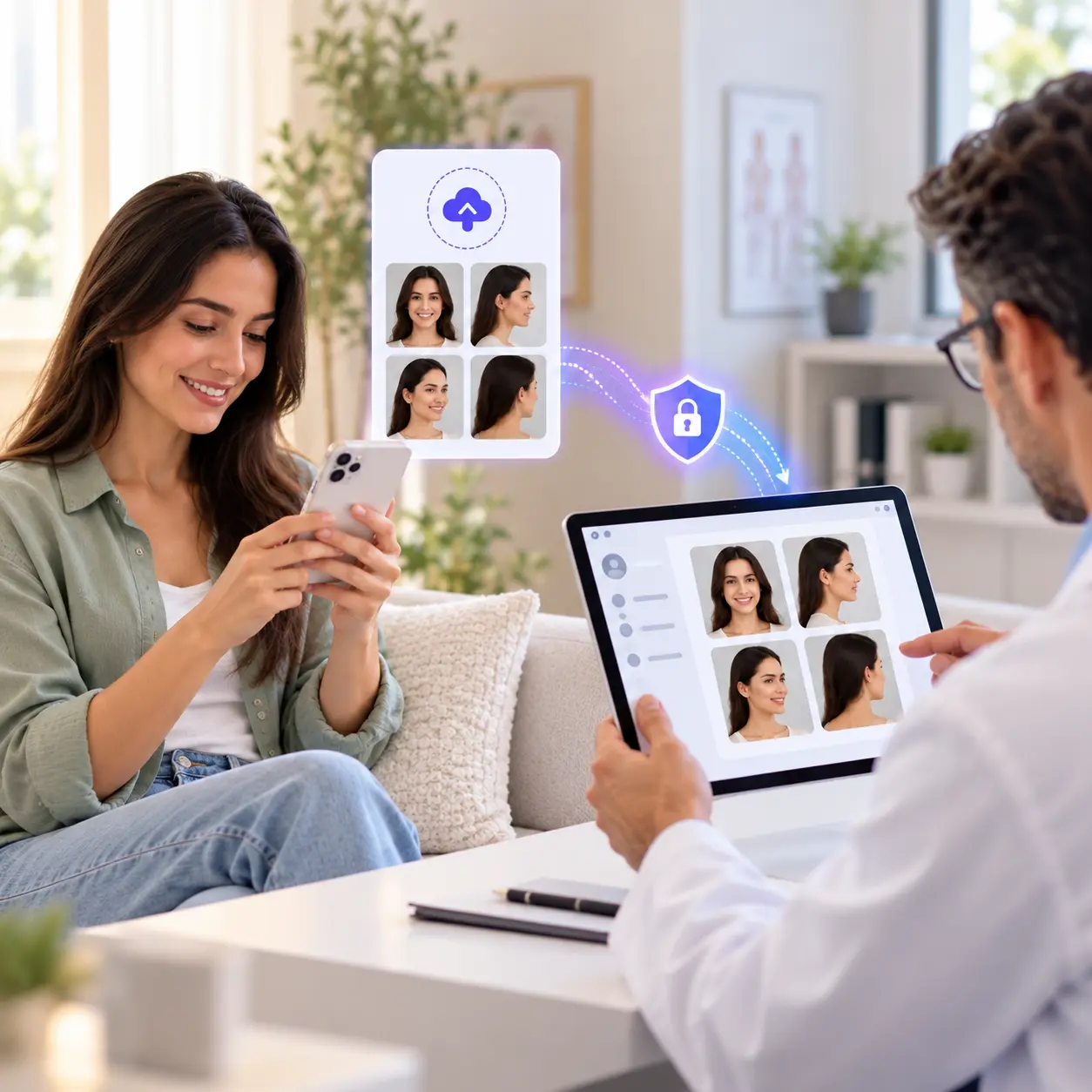
Send one secure link. Patients upload from their browser, and the files land in the right patient record.
Remote photo collection
Send a secure link
From the patient record
Share link with patient
- SMS
Link only. No patient details.
Patient's phone
Opens in any browser. No app.
Photos arrive securely
-
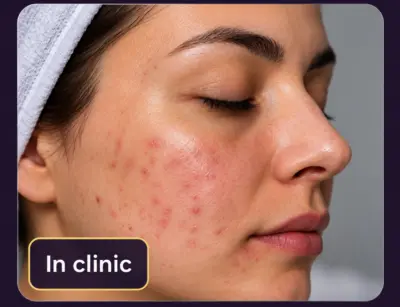 Before
-
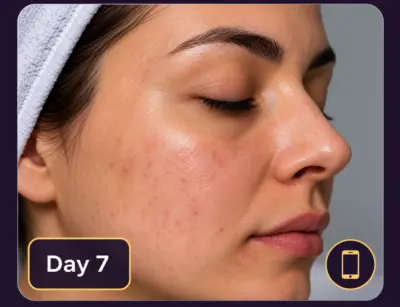 Day 7
Day 7
-
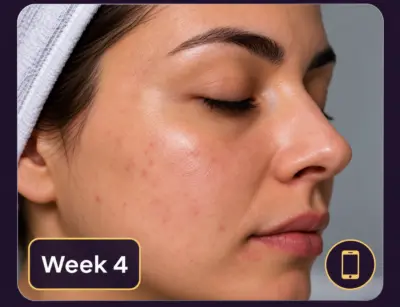 Week 4
-
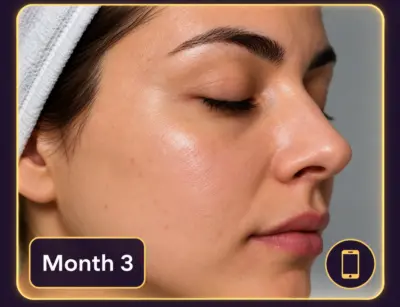 Final result
Patients do not always come back for follow-up.
They may be traveling, busy, recovering at home, living in another city, or they may simply forget to book their next appointment. For dermatology clinics, plastic surgeons, aesthetic practices and medical spas, that leaves a big gap in your records: no progress photos, no record of how they healed, no full photo history, and no final before and after result.
CureCast helps clinics collect patient photos, videos and documents remotely through a secure upload link. Send it by email, SMS, WhatsApp or any channel your practice approves. The patient opens it in their browser and uploads. The photos go straight into the patient’s CureCast record, not through the messaging app.
No app download. No photos stuck in chat galleries. No chasing patients for photos.
What is a secure patient photo upload link?
A secure patient photo upload link lets a clinic collect photos, videos and documents directly from a patient’s browser without asking them to email or message the files. The patient opens the link, uploads their files, and the files go directly into the patient’s CureCast record.
How the secure photo upload link works
CureCast makes remote patient photo collection simple for both your clinic and your patients.
- 1 Open the patient's record in CureCast.
- 2 Create a secure photo and file upload link.
- 3 Share it by email, SMS, WhatsApp or another approved channel.
- 4 Get notified when the patient uploads.
- 5 Review the files in the patient's chart or file manager.
- 1 They receive a secure upload link.
- 2 They open it on a phone, tablet, PC or Mac.
- 3 They upload photos, videos or documents from their browser.
- 4 No account to create and no CureCast app to install.
- 5 Files go straight to the clinic's CureCast account.
When the patient taps the link, it opens in their browser, not inside WhatsApp, SMS or email. Those apps only carry the link text. The photo is uploaded straight to CureCast, so it never passes through the messaging app at all.
Uploaded files are available to authorized clinic staff in CureCast. It is a cleaner, more organized way to collect clinical photos than asking patients to send sensitive images to personal phones or scattered message threads.
Why clinics need remote photo collection
Remote photo upload is not just a nice extra. It helps clinics keep better records, stay connected with patients between visits, reduce staff workload and build a complete treatment history.
Stop losing important follow-up photos
A patient may be thrilled with their acne results, pigmentation improvement, hair restoration progress, body contouring outcome or post-surgery healing, but never come back to the clinic for final photos. Without those photos, your practice loses:
- The full photo history of the patient’s progress
- Important clinical records
- A way to check healing between appointments
- Possible before and after records
- Photos you can use in marketing, if the patient agrees and local rules allow it
- Photos to help explain results or answer patient concerns
Take follow-up photos at key points such as Day 7, Week 4, Month 3, or after a treatment series. For practices that need those follow-up images to remain comparable, standardized clinical photography helps recreate consistent views across visits.
Replace manual photo chasing
Many clinics still rely on staff sending repeated messages:
This creates extra work for front desk teams, coordinators, nurses and clinicians. CureCast gives your team one simple process: send a secure link, receive the upload and review the photos in the patient chart.
Keep patient photos organized
When a patient uploads through CureCast, you find it in the right patient record instead of searching through:
- Personal phone camera rolls
- Staff WhatsApp chats
- Download folders
- Multiple clinic devices
- Personal iCloud or Google Photos accounts
- Shared inboxes
- Unlabeled computer folders
For clinics managing hundreds or thousands of patients, you need one place where any photo can be found quickly.
How do clinics get photos from patients who don’t come back?
Clinics can send patients a secure photo upload link after treatment instead of asking them to return to the clinic just to provide follow-up photos. The patient opens the link on their phone or computer, uploads the requested images, and the files are added to the patient’s record. This helps clinics build a complete before-and-after photo history, even when the patient cannot return for an in-person follow-up.
Is it legal to send patient photos on WhatsApp?
It depends on your market and on which direction the photo travels. A patient choosing to send you their own image is treated differently from your clinic storing or forwarding it. In most markets the encryption in transit is not the problem. Where the image lands is, and so is who the messaging app learns about along the way.
What actually goes wrong
WhatsApp encrypts messages in transit, and that part is not in dispute. The exposure sits at the ends of the conversation.
- 1The image saves to the phone.On most handsets WhatsApp writes received media to the device gallery by default, so the patient's photo is now sitting in a staff member's camera roll.
- 2The gallery syncs to a personal cloud.From there it reaches the staff member's own iCloud or Google account, which your practice cannot see, cannot audit and cannot delete from.
- 3No agreement covers it.Meta does not offer a Business Associate Agreement or a healthcare data processing agreement for consumer WhatsApp, so the transfer sits outside your compliance documentation entirely.
The position in each market
| Market | Where the law lands |
|---|---|
| United States | HIPAA applies to your practice, not to the patient, so a patient may choose to send you their own photo. What your practice must not do is treat consumer messaging as a record store or a channel for onward disclosure. Meta does not sign a BAA for consumer WhatsApp, and a staff camera roll is not part of your designated record set. |
| United Kingdom | Clinical photographs are special category data under UK GDPR. Direct care can rely on Article 9(2)(h), but Article 32 still requires security appropriate to the risk and you must be able to evidence it. GMC guidance on making and using visual recordings, last updated 18 December 2024, requires appropriate secure arrangements for storing recordings and bars use beyond the scope of the original consent. |
| United Arab Emirates | The strictest of the five. Article 13 of Federal Law No. 2 of 2019 prohibits storing, processing or transferring health data relating to care provided inside the UAE outside the country. WhatsApp's infrastructure is not in the UAE, so sending a patient photograph through it is a cross-border transfer of health data. Article 24 sets the penalty at AED 500,000 to 700,000. |
| Australia | Sending a patient image through an overseas service is a cross-border disclosure under APP 8, and section 16C makes your practice accountable for the overseas recipient's handling as if you had done it yourself. Separately, the Ahpra guidelines for practitioners who perform non-surgical cosmetic procedures require patient images to be stored on a secure device and not on a personal device. |
| Canada | PHIPA section 12 requires reasonable steps to protect personal health information against unauthorised use or disclosure, and a personal camera roll is difficult to defend as reasonable. In Quebec, Law 25 requires a privacy impact assessment before communicating personal information outside the province, which a consumer messaging service is. |
Can I send a patient photo to a colleague for a second opinion?
This is the most common version of the question and the least examined. Sending the image to your medical director over WhatsApp creates a second uncontrolled copy on a second personal device, doubling the exposure without adding any record of the consultation. The safer route is to grant the colleague access to the patient record so they view the image in place, which also leaves an audit entry showing who looked and when.
Is it safe to send the CureCast upload link by WhatsApp?
Yes, for two separate reasons. The first is that the link carries no patient information. WhatsApp transports the link text only, and when the patient taps it the link opens in their browser and the photo uploads straight into your clinic's CureCast account. The image never passes through the messaging app and never lands in anyone's camera roll.
The second reason matters more than most clinics realise. CureCast sends the link to the number already held in the patient's record, so nobody has to save the patient to a phone's contacts or open a conversation with them. That sounds like a convenience. It is actually a privacy control, because a message thread between your clinic and a named individual discloses that the person is your patient, and in an aesthetic practice that fact is health information in its own right, before any photograph is involved.
| Sending it manually from a staff phone | Sending it from CureCast |
|---|---|
| The patient's name and number are saved into a staff member's personal address book. | The number stays in the patient record and is never copied anywhere else. |
| A conversation thread with a named patient now exists on a personal device. | No contact is created and no thread exists on anyone's phone. |
| Both the contact and the thread remain after that staff member leaves the practice. | Nothing to find and nothing to remove at offboarding. |
| The staff member's personal mobile number is disclosed to the patient. | The patient is contacted by the practice, not by an individual. |
| For a UAE clinic, the patient's number has been entered into a service hosted outside the UAE. | The patient's contact details stay in CureCast's UAE-resident storage. |
The distinction is simple enough to state in one line: the messaging app should never learn who your patient is. Sending the link from CureCast keeps the patient's identity, their number and their photographs all inside the practice's own system.
The practical summary. Use WhatsApp to reach the patient. Do not use it to carry the photograph, and do not let it learn who the patient is. That distinction resolves the compliance question in every market above, and it is the reason CureCast sends the link from the patient record rather than asking a staff member to message an image. This page is general information and not legal advice, and messaging policy should be confirmed with your own adviser in each market you operate in.
How to Collect Post-Treatment Photos From Patients Remotely
1. Send a secure photo upload link
Send the patient a link by SMS or email so they can submit follow-up photos from home without needing to return to the clinic.
2. Give clear photo instructions
Explain which views to capture, the preferred lighting, the camera angle, and when the photographs should be taken.
3. Keep photos connected to the patient record
Use a secure workflow that allows staff to associate incoming photographs with the correct patient and treatment, subject to appropriate access controls.
4. Review and follow up
Have the clinical team review the images and arrange a consultation when necessary. Remote photographs do not replace an in-person examination when one is clinically required.
Built for dermatology clinics
Skin treatment results often take time to show. Patients may not notice progress day to day, especially with acne, melasma, pigmentation, rosacea, scars, hair loss and skin rejuvenation. A regular photo history helps doctors and patients see the change more clearly over weeks and months.
Use secure upload links for:
Secure upload links can be used for acne progress photos, pigmentation and melasma tracking, hair-loss and regrowth photos, laser treatment follow-ups, post-procedure healing, prescription follow-ups, acne scar treatment, rosacea monitoring, PRP and microneedling, chemical peel recovery, and skin rejuvenation.
Instead of asking a patient to come back just for a photo check, send a link and review their photos remotely. If the doctor needs to see the patient in person, the clinic can then book a follow-up visit.
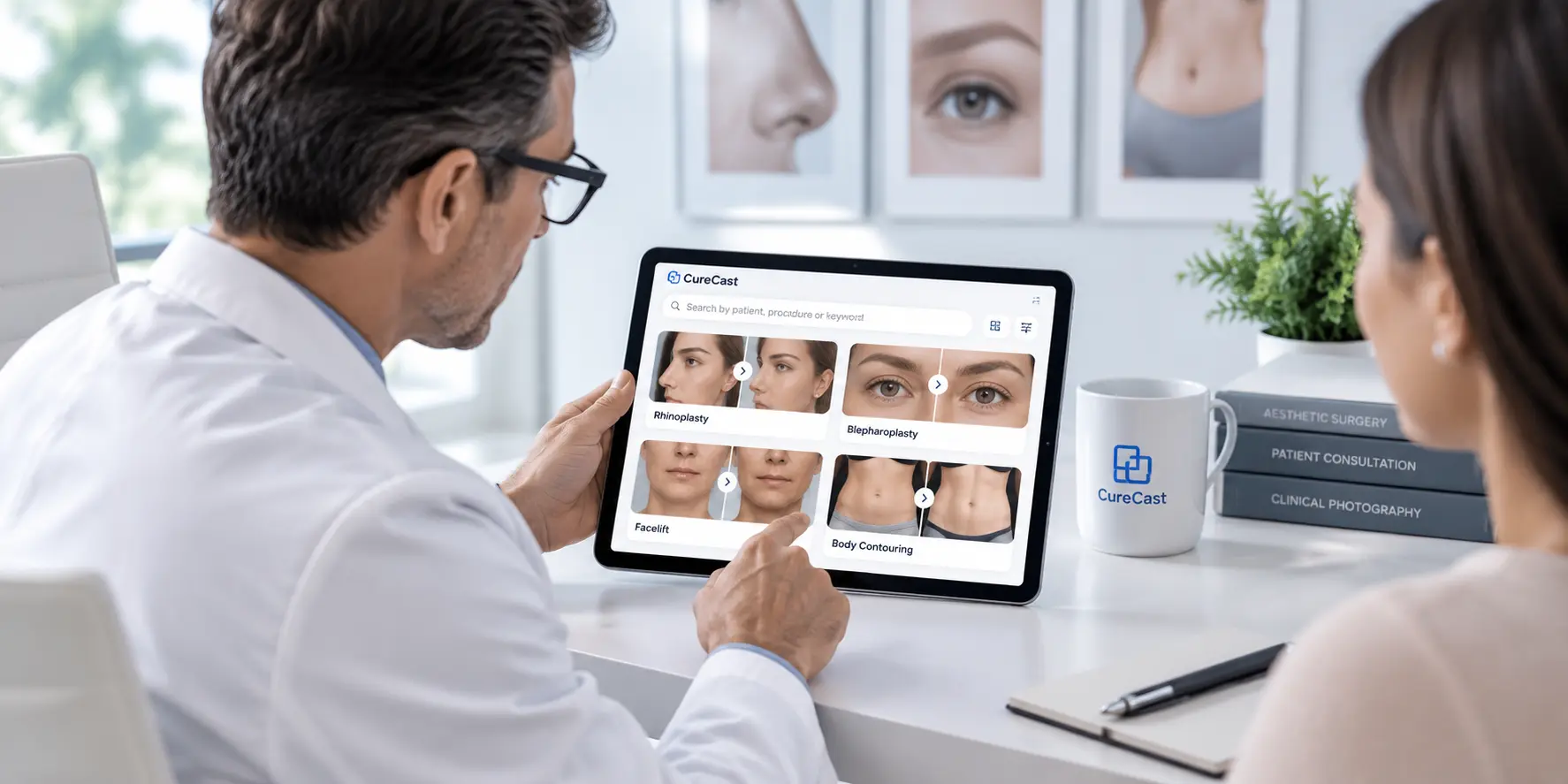
CureCast also organizes photos by patient, condition, treatment, visit, body area and your own custom labels, so the right photo is always easy to find.
Built for plastic surgery practices
Plastic surgery results depend on clear photos before surgery, after surgery and at every follow-up. But after surgery, patients may recover at home, travel abroad, go back to work, or simply miss their photo appointment. That can leave a practice without the final photos needed to show healing and long-term results.
Use secure upload links for:
Plastic surgery practices can use secure upload links for post-operative healing updates, breast augmentation, breast reduction and lift recovery, liposuction and body contouring, facelift and eyelid surgery, rhinoplasty recovery, scar monitoring, injectable follow-ups, tummy tuck recovery, and related recovery documents.
The patient uploads from their browser, and the clinic receives the files in the patient record. Your team keeps a full photo history for every patient, even when they are recovering far away, even in another country.
Built for medical spas and aesthetic clinics
Medical spas and aesthetic practices depend on photos to show results. Clients want to see what their treatment can achieve, and clinicians need a clear record of progress across sessions. But many treatments need several visits, and clients often do not come back at the exact time their best results are visible.
Use secure upload links for:
Medical spas and aesthetic clinics can use secure upload links for Botox and dermal filler follow-ups, skin tightening, body contouring, laser resurfacing, microneedling, RF microneedling, PRP and hair restoration, laser hair reduction, chemical peel recovery, HIFU, radiofrequency and facial rejuvenation.
If the patient has given written permission and local advertising rules allow it, these photos can also help your practice create before and after photos for marketing, used the right way.
One workflow for global clinics
CureCast is built for clinics that care for local, traveling, remote and international patients.
Whether your practice is in the United States, Canada, the United Kingdom, Australia, the UAE, Europe, Asia or another market.
- Dermatology groups with multiple locations
- Med spas with repeat treatment clients
- Patients who travel for treatment
- Patients kept away by work, recovery, childcare or distance
- Plastic surgery practices with international patients
- Clinics serving rural or remote areas
- Private or online follow-up care
- Aesthetic follow-up across cities and countries
The patient only needs a browser and an internet connection. They can upload from an iPhone, Android phone, tablet, PC or Mac.
A better alternative to personal WhatsApp and phone galleries
WhatsApp, email and SMS are handy for telling a patient that you need their photos. But personal message threads and staff phones are not a safe place to keep patient photos long term. When photos are shared informally, clinics may face practical and privacy problems:
- Photos may be saved on staff members' personal phones
- Images may sync to personal cloud accounts
- Staff may leave the clinic with old patient photos still on their phones
- Photos may be hard to find during a consultation
- File names and upload dates may be unclear
- Staff may see photos they don't need to see
- You may not know who viewed or changed a photo
- Consent forms may be kept separately from patient photos
- Teams at different locations may not see the same patient history
With CureCast, the patient uploads directly to your clinic’s account through a secure link. The link makes it easy for patients to send photos, and the photos stay safe inside CureCast.
Which channel should you use?
The messaging app only carries the link. The photos go straight to CureCast server. Messaging rules differ by country, so follow your local rules and your practice policy.
Security features for patient photo workflows
Healthcare and aesthetic practices need more than a place to store photos. They need to control who sees what, on which device, and for how long.
These tools help practices manage clinical photos and patient information responsibly. CureCast supports privacy-conscious workflows for clinics working under requirements such as HIPAA in the United States and GDPR in Europe, alongside applicable privacy and advertising requirements in other markets. Every practice still needs clear policies, appropriate staff access, staff training, consent processes, device rules, and procedures for handling data incidents.
Make remote follow-up easy
Patients should not have to come back to your clinic just to send a progress photo. And your staff should not have to search personal chats, camera rolls and inboxes to find it. With CureCast secure patient upload links, you can:
- Collect post-treatment photos from anywhere
- Keep a full photo history for every patient
- Keep photos organized in the correct record
- Keep better records across every specialty
- Request videos and documents remotely
- Reduce staff follow-up work
- Keep patient photos safe and under your control
- Give patients a simple upload with no app needed
Send one secure link. Let patients upload from anywhere. Keep every important image where it belongs.
See How CureCast Fits Your Practice
Discuss how CureCast fits into your clinical photo workflow, from capturing and organizing patient photos to securely managing them across your practice.
Prefer email? [email protected]
Keep every follow-up photo where it belongs.
Collect photos, videos and documents remotely through a secure link, then keep them organized in the right patient record without relying on personal phones, message threads or scattered inboxes.
Secure patient photo collection
- ✓ Secure upload links
- ✓ No patient app required
- ✓ Photos, videos and documents
- ✓ Files saved to the right patient record