Clinical Photo Management for UK Clinics
CureCast helps UK plastic surgery, dermatology, med spa and surgical practices store, organise and compare patient photos, track each patient’s progress, and keep consultation photos apart from any photos proposed for advertising.
From the first consultation to the post-operative review
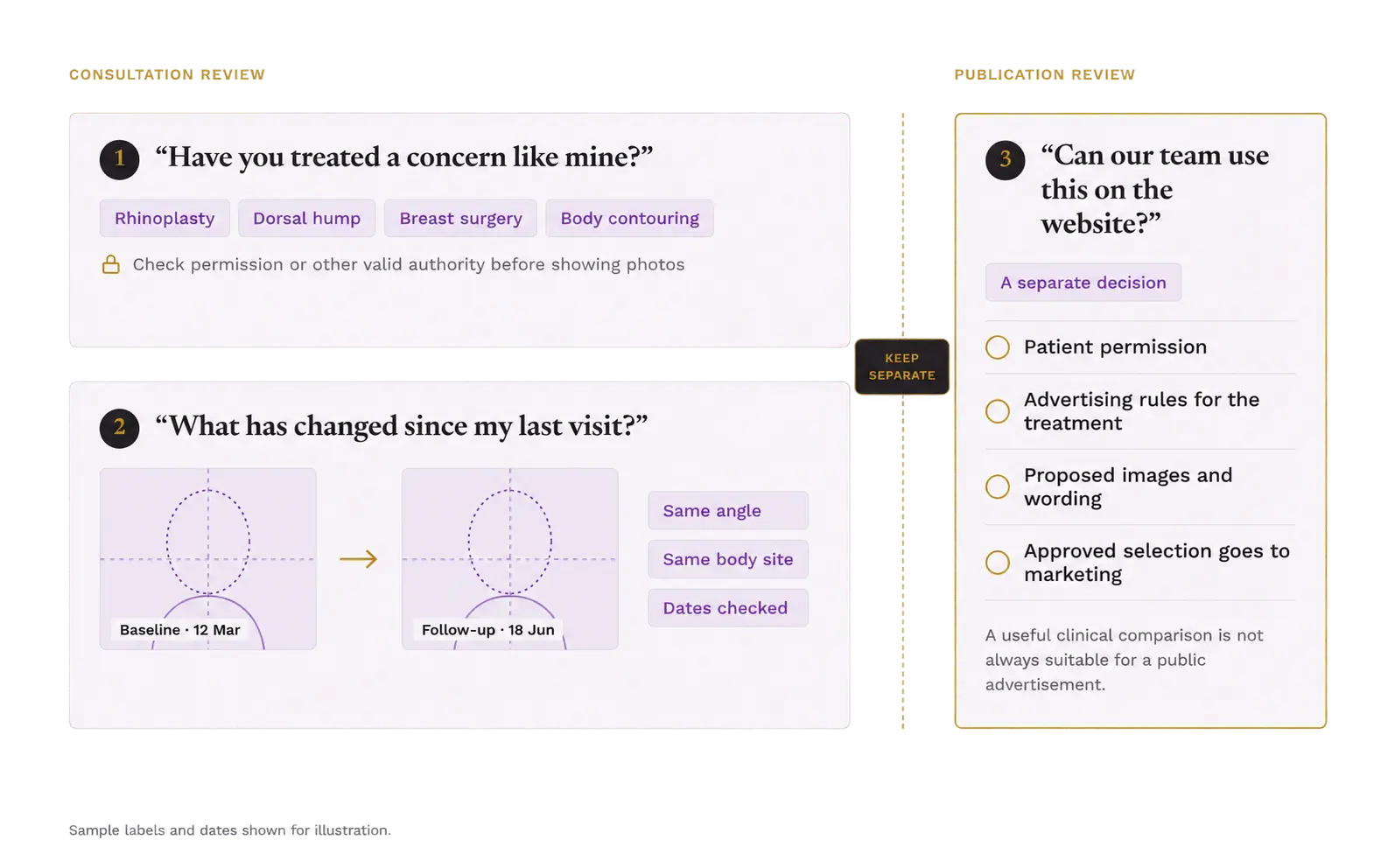
Clinical photo management that answers three common patient questions
“Have you treated a concern like mine?”
Find the right procedure view in seconds, using the labels your team already knows: rhinoplasty, dorsal hump, breast surgery or body contouring. Before you show another patient’s photos, confirm you have the right permission to share them. This lets you give a confident, relevant answer while protecting patient privacy.
“What has changed since my last visit?”
Open the patient’s own photo history and pick the matching baseline and follow-up views. Check the date, angle and body site, so you compare like with like. The conversation stays focused on that patient’s own progress and care.
“Can our team use this on the website?”
Treat this as a separate decision. Permission for treatment is not permission to show a patient’s photos. Check that she has said yes to this photo, for this place, such as your website or Instagram, and for a stated time. Then move only the approved photos to your marketing album, so your team searches only the results you have permission to show.
Can UK clinics post Botox before-and-after photos on social media?
Botox and other botulinum toxin injections are prescription-only medicines. UK clinics cannot advertise them to the public under CAP Code rule 12.12 and the Human Medicines Regulations 2012. The restriction still applies when a registered medical professional gives the treatment and when a patient gives permission to share their photos.
A before-and-after photo can promote the medicine indirectly by showing the results people might expect. The The Advertising Standards Authority (ASA) advises clinics to avoid using these photos to promote botulinum toxin. Check the whole post, including the images, caption and hashtags before publishing anywhere. A brand name in any of these can identify the medicine being promoted. Read the ASA’s Instagram advertising guidance.
The rules cover paid ads, unpaid marketing posts and influencer content. Advertising aimed exclusively at healthcare professionals is outside this restriction, but a publicly visible Instagram post can reach patients. For example, an unpaid post showing a patient’s results with #Botox still counts as public promotion. Read the CAP enforcement notice on botulinum toxin advertising.
What the ASA says you can do
If your clinic offers both prescription-only treatments and treatments that do not require a prescription, you may be able to use before-and-after photos in public ads. The photos must show a treatment that does not require a prescription, and the ad must clearly name that treatment. Read the ASA guidance.
Label each photo with the actual treatment in your photo library. A broad label like “injectables” makes it hard for your team to tell which treatment the photos show when reviewing an ad.
How CureCast handles it
- Every photograph is tagged with its treatment at the moment of capture, not filed later. Toxin, filler, skin, laser, surgery, or whatever names your clinic uses.
- Marketing permission is recorded against the photograph, through the consent form, as a separate decision from consent to treat.
- A marketing album only contains photographs that carry marketing permission, and you filter it by treatment. Your social media is built from a pool you have already narrowed.
How CureCast helps clinics find, compare and manage patient photos
Find patient photos during a consultation
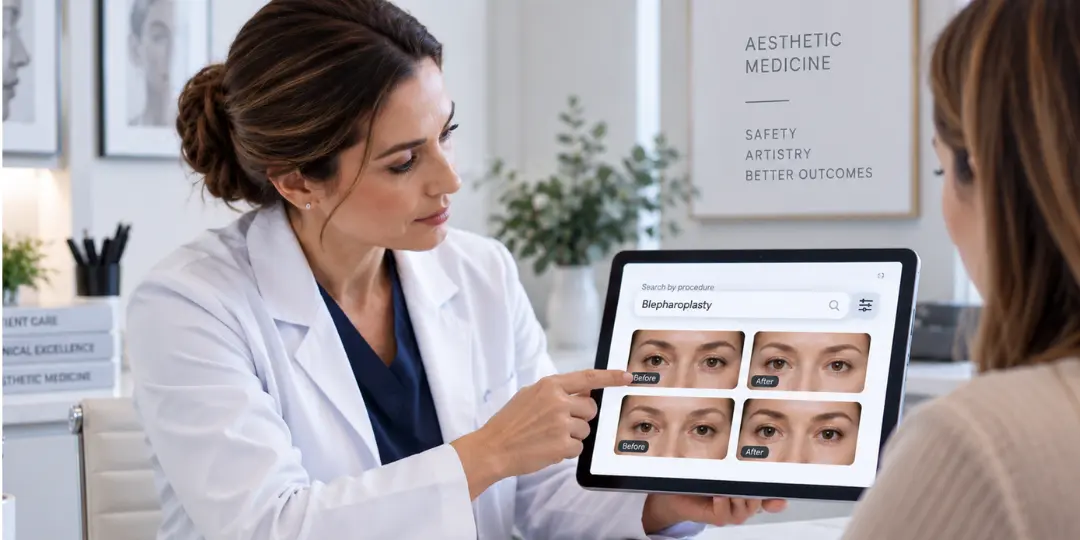
Search by procedure, diagnosis, body area, patient name or phone number. Add tags when you take photos so your team can find them later without searching through folders.
Compare before-and-after photos from two visits
Choose two photos and compare them side by side or with an overlay. Add your clinic logo or watermark and export in 9:16, 16:9, 4:3 or 3:4.
Take follow-up photos from the same angle
TrueAlign Match shows the earlier photo on the live camera screen as a ghost image or an outline for standardized clinical photography. A level guide helps you spot camera tilt. This makes it easier to match the original view, especially when comparing rhinoplasty profiles. TrueAlign Match is available on iPhone and iPad.
Collect post-operative photos from home
Send the patient a secure upload link by email or message. They can use their phone to send photos, videos or documents without installing an app, creating an account or entering a password. The files go straight into their patient record.
Keep patient photos out of the phone’s camera roll
Photos taken in CureCast are saved to the patient record and stay out of the device’s camera roll. If a staff member leaves, an administrator can revoke their access, including on a device they still have. The photos stay with the clinic. CureCast also supports two-factor authentication (2FA), adding an extra verification step at sign-in.
Your team can access the same photo library on Android phones and tablets, iPhone, iPad and desktop browsers. Guided capture overlays and photo annotation are available on iPhone and iPad.
Clinical photo management in a London plastic surgery practice
CureCast is the perfect tool for a doctor who needs to store images and documents related to his patients. The app is easy to use, the images are safely stored and the classification is easy and immediate. The possibility to create pre and post pictures in a blink allows the doctor to show immediately the results to his patients and create a perfect gallery to be shown to new patients who want to receive the same treatment.
Dr. Roberto Viel
ISAPS Plastic Surgeon · Cadogan Clinic · UK
Patient Photo Storage for UK Clinics: Hosting and UK GDPR
UK clinic accounts are hosted on Amazon Web Services in Mumbai. CureCast Technologies is headquartered in Ahmedabad, India. UK-region hosting is available on request for clinics whose procurement requires it, and we will confirm the arrangement in writing before you add any patient data.
What that means legally
There is no requirement in UK law to store patient photographs in the UK. There is no data localization rule for health data, and a private clinic with no NHS contract has no Data Security and Protection Toolkit return to make. What UK GDPR requires for a transfer outside the UK is a lawful mechanism, because India is not covered by UK adequacy regulations.
- A transfer agreement. Ask for the UK International Data Transfer Agreement (IDTA) or the UK Addendum to the EU Standard Contractual Clauses. CureCast provides the applicable agreement.
- A transfer risk assessment. UK legislation calls this the data protection test. It checks whether patient information will receive a similar level of protection after the transfer. CureCast shares its assessment to help your clinic complete its own review.
- A data processing agreement. Ask for the terms required by Article 28 of the UK GDPR. These cover how the provider handles patient data, including confidentiality, security, subcontractors and what happens to the data when your contract ends. CureCast includes these terms in its data processing agreement.
Ask for all three before you sign anything, from us or from anyone else. A vendor who cannot produce them quickly is telling you something.
What UK clinics must document about patient photos
Patient photos that reveal a person’s health condition or treatment are special category data under Article 9 of the UK GDPR. Even a two-person clinic must document how it handles these photos in its record of processing activities. Include why you take the photos, who you share them with and how long you keep them.
Some UK GDPR breaches carry a maximum fine of £17.5 million or 4% of worldwide annual turnover in the previous financial year, whichever is higher. This is the higher penalty tier. Breaches of the Article 30 record-keeping requirement fall under a lower tier.
How long to keep the patient photographs
The UK GDPR sets no retention period. Article 5(1)(e) says keep personal data no longer than necessary, and leaves the clinic to decide what necessary means.
In practice UK private practice looks to the NHS Records Management Code of Practice 2021, which applies to NHS bodies and is widely adopted as good practice elsewhere. Its headline periods:
- Adults: eight years after the last contact.
- Children: until the patient’s 25th birthday, or their 26th if treatment ended when they were 17.
The BMA treats these as minimums rather than ceilings, and a surgical practice often has good reason to keep records longer, because a breast augmentation patient may return at twelve years for implant exchange and the pre-operative photographs are the only record of what she looked like before.
More detail in our patient photo retention guide.
CureCast Pricing and Free Trial for UK Clinics
- Published pricing. Annual plans start from $150 per month billed annually, with monthly plans available.
- Unlimited photographs, videos and documents. No storage cap, no per-file charge, no overage as the library grows.
- No setup fee, no onboarding fee, no training fee, no contract. Cancel monthly and export your data.
- Fourteen-day trial, no card. Start on the website, iPhone or Android, with the same login across every device.
Four things to test during your CureCast trial
- Find a relevant case. Run a practice consultation with sample cases. Note how long it takes for a staff member to find photos that answer a patient’s question.
- Match a follow-up photo. Use TrueAlign Match on an iPhone or iPad to retake a sample photo. Compare the two images for angle, framing and camera tilt.
- Check staff permissions. Remove a test staff member’s permission to download photos. Sign in as that staff member and confirm the download is blocked.
- Export a sample patient’s photos. Open the downloaded files and check that all the photos you expected are there and easy to use.
See How CureCast Fits Your Practice
Discuss how CureCast fits into your clinical photo workflow, from capturing and organizing patient photos to securely managing them across your practice.
Prefer email? [email protected]